
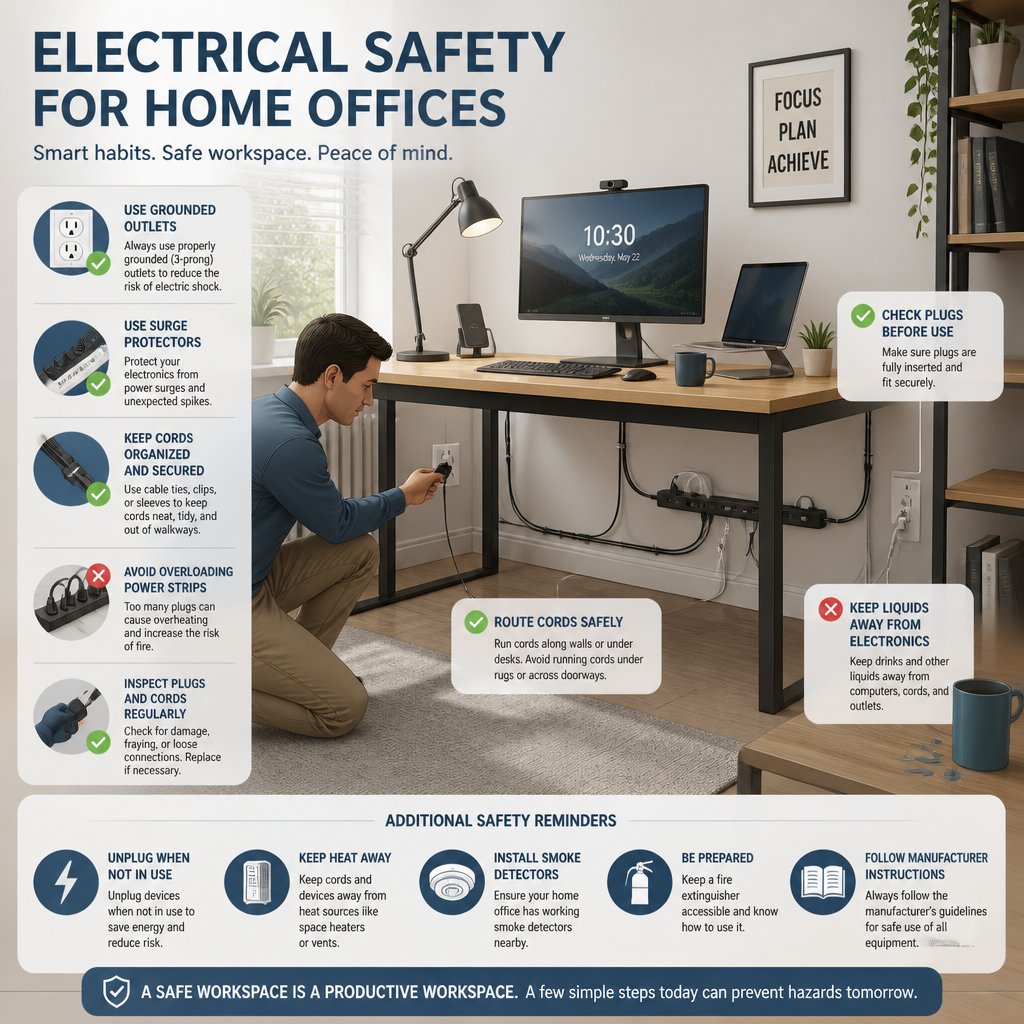
Work-from-home setups usually start simple—just a laptop and maybe a lamp. Before you know it, though, you’ve got monitors, chargers, printers, docking stations, and Wi-Fi gear all plugged in. It’s easy to overlook small mistakes until they turn into real safety problems. The best electrical safety tips for home offices really come down to matching your gear with the right outlets, cords, and circuits before you run into trouble.
A safe desk isn’t just about convenience. It protects your devices, lowers fire risk, and keeps your workspace running without those annoying shutdowns when you’re busiest. If your office is starting to feel like a tangle of cords and crowded outlets, it’s probably time to rethink the setup or call a licensed electrician for some advice—whether you’re in Austin, Round Rock, Cedar Park, Lakeway, or anywhere around Central Texas.
Why Power Risks Increase In Work-From-Home Setups
Home offices put steady pressure on the same outlets for hours, day after day. That kind of load can show up weak wiring, old receptacles, or power strips that just aren’t up for it. If your workspace shares a room with other appliances or the TV, the risk only goes up.
How Everyday Devices Add Up On One Circuit
A laptop barely sips power, but let’s be honest—most setups include a monitor, phone charger, printer, modem, router, lamp, and maybe even a space heater or desktop PC. All together, that can push one circuit to its limit faster than you’d expect. That’s when you start seeing overloaded circuits, tripped breakers, and outlets that feel worryingly warm.
Why Older Homes Need Extra Attention
Older homes in places like Georgetown, Westlake, or Dripping Springs often don’t have enough outlets, and the wiring wasn’t designed for today’s device-heavy offices. If you notice lights dimming or outlets that feel loose, your electrical system might need an inspection before you add more gear. A quick safety check can also tell you if it’s time for outlet and switch upgrades to make your office safer and just easier to use.
The Safest Way To Set Up Desks, Outlets, And Cords
A smart desk layout keeps power close for daily use, but avoids putting strain on cords and plugs. The real goal? Electricity flows cleanly, and you don’t trip over anything.
Choosing Outlet Locations For Daily Use
Set up your desk near outlets so you’re not relying on long extension cords. If your current outlet placement forces awkward cable runs, an electrician can usually add a better spot or suggest safer routing. In a lot of Central Texas homes, a few smart outlet changes can make things a lot more manageable.
Preventing Trip Hazards And Pinched Cables
Keep cords out of walkways, away from chair wheels, and clear of drawer tracks or spots where your desk presses against a wall. Pinched cables wear out fast and can damage both the cord and the plug. Use cable clips, raceways, or cord covers to keep everything flat and out of the way.
Keeping Chargers And Power Strips Ventilated
Power strips and chargers need room to breathe. Don’t bury them under piles of paper, rugs, or jammed storage bins—heat builds up fast around electronics. Leave space around adapters, especially if you’ve got a computer tower, printer, or a bunch of charging bricks.
How To Avoid Overloading Circuits And Power Strips
It’s easy to assume any outlet or power strip can handle whatever you throw at it. But high-use workspaces need a balanced load, not a strip crammed with plugs.
Devices That Draw More Power Than Homeowners Expect
Printers, space heaters, desktops, and big monitors can pull a surprising amount of power—way more than a couple of chargers or a lamp. If you’re running extra equipment like networking gear, a second computer, or charging stations, the load can stack up fast.
When A Dedicated Circuit Makes Sense
A dedicated circuit makes sense if you’ve got heavy equipment, frequent breaker trips, or several devices running all day. It’s also smart if you’re adding things like an EV charger in the garage, a ceiling fan, or more efficient lighting on the same floor. For growing workspaces, dedicated power keeps things reliable and safer.
Why Extension Cords Should Not Be Permanent Solutions
Extension cords are for quick fixes, not your main power plan. Using them long-term can cause wear, overheating, and loose connections, especially if you run them under rugs or stretch them across the room. If you need a permanent solution, outlet upgrades or wiring improvements are the way to go.
Warning Signs That Point To An Electrical Problem
Your home usually gives you hints when the electrical system is struggling. Small signs can turn into bigger headaches if you ignore them.
Flickering Lights, Warm Plates, And Buzzing Sounds
Flickering lights, warm outlets, or a buzzing noise near a receptacle often mean loose wiring or overload. If you spot any of these at your desk, stop using that outlet until someone checks it out. Outlets shouldn’t feel hot or make noise.
Repeated Breaker Trips During Work Hours
If the breaker trips every time you fire up your office gear, that’s a warning sign. Frequent trips usually mean the circuit’s overloaded or there’s a deeper wiring problem. It’s worth getting it checked before it causes bigger issues.
When Burning Smells Require Immediate Action
If you smell burning, see scorch marks, or spot a melted plug, act fast. Unplug the device if you can do it safely, turn off power to the area if needed, and call a licensed electrician right away. Don’t keep working at that desk until you know what’s going on.
Upgrades That Improve Safety And Reliability
Some upgrades just make life easier. Others protect your equipment and keep your office running smoothly, day after day.
Modern Outlet And Switch Replacements
Old outlets get loose, making plugs less secure and raising the risk of heat. Swapping them for modern outlets improves grip, cuts down on wear, and just feels better to use. In busy homes, new outlets and switches can also add USB charging or smarter controls.
Surge Protection For Computers And Networking Gear
A surge protector is your first line of defense for computers, routers, monitors, and modems. It helps limit damage from power spikes during storms or utility hiccups. If you want better protection, a whole-home surge solution is worth thinking about—especially if you rely on sensitive work gear.
Panel Improvements For Expanding Equipment Needs
If your office is growing, your electrical panel might need attention, too. Upgrading the panel can improve reliability and let your home handle more circuits without annoying trips. This is especially true for setups in Leander, Hutto, Kyle, and nearby areas where offices often share power with other rooms.
Smart Home Features That Support Safer Control
Smart switches, timers, and monitored outlets help you control power more safely. They make it simple to shut off unused gear, manage lighting, and cut wasted energy when the workday ends. For a lot of folks, smart controls add convenience without making things more complicated.
When To Call A Licensed Electrician
Some fixes are easy—swap a worn cord, move a plug. But other issues need professional tools, code knowledge, and experience.
Projects That Should Never Be DIY
Don’t try wiring changes, panel work, breaker swaps, or hidden outlet repairs yourself. These jobs deal with live circuits and can cause shock, fire, or code problems if you get them wrong. For new wiring, generator hookups, or big safety upgrades, call a licensed electrician.
What To Expect From A Safety Inspection In Central Texas
A pro safety inspection covers outlet testing, load checks, breaker reviews, and a close look at visible wiring and cords. In Central Texas homes—especially older ones in Bee Cave, Spicewood, and Westlake—an inspection can catch issues before they mess up your workday. It’s a practical way to boost safety and peace of mind.
Frequently Asked Questions
How can I safely use extension cords and power strips at my desk?
Use them only for short-term needs and pick products rated for your devices. Keep them visible, uncovered, and away from heat or foot traffic.
What are the warning signs that an outlet or plug is overheating?
If a faceplate feels warm, looks discolored or melted, smells burnt, or the plug feels loose, that’s trouble. Stop using that outlet and get it checked soon.
How do I avoid overloading a circuit when running multiple devices in one room?
Spread devices across more than one circuit if you can, and don’t stack high-draw items on a single strip. If breakers trip or lights dim when you turn things on, you might be overloading the circuit.
What’s the safest way to manage and route cables to prevent trips or damage?
Run cords along walls or under covers, not across open walkways. Use clips, ties, or raceways to keep cords flat and out from under furniture.
How often should I check or replace cords, plugs, and chargers for wear and tear?
Give them a look every few months. Replace anything frayed, cracked, bent, or loose right away. If a charger runs unusually hot, swap it out.
When should I call a licensed electrician for issues in my workspace?
If your breakers keep tripping, outlets start buzzing, or you catch a whiff of something burning—don’t mess around. That’s when you call a licensed electrician. Same goes if your outlets feel warm or you need any wiring changed and actually want it done right. Thinking about a panel upgrade or adding outlets? Or maybe you’re loading up your home office with more gear? Yeah, it’s definitely worth having a pro check things out first.