
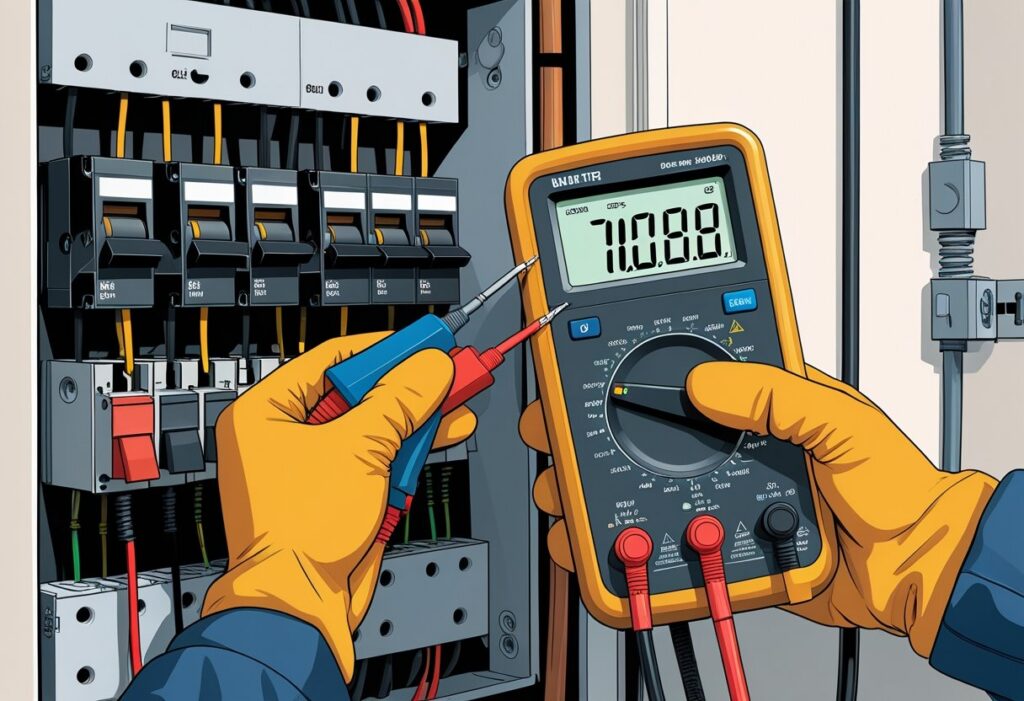
Testing a circuit breaker with a multimeter is a simple way to check if it works properly. You can test a circuit breaker by measuring the voltage across its terminals with a multimeter.
A good breaker should show around 120 volts for a single-pole or 200 to 240 volts for a double-pole breaker. This tells you if electricity is flowing correctly or if the breaker might be faulty.
You don’t need to be an expert to do this yourself. Use the right settings and stay cautious when working with electricity.
Understanding Circuit Breakers
Circuit breakers protect your home’s electrical system by stopping the flow of electricity when there’s a problem. They come in different types and can fail for specific reasons.
Knowing how they work and why they might fail helps you test and maintain them safely.
How Circuit Breakers Work
A circuit breaker acts like a switch that automatically turns off when there is too much current in a circuit. This prevents wires from overheating and causing fires.
Inside the breaker, a metal strip bends when heated by excess current and triggers the breaker to trip. You can reset the breaker after it trips by flipping the switch back on.
This keeps your electrical system safe by cutting power when it detects an overload or short circuit.
Types of Circuit Breakers
The most common types you’ll find in your home are:
- Standard circuit breakers: Trip when there’s too much current.
- Ground Fault Circuit Interrupters (GFCI): Protect against electrical shocks by cutting power if current leaks to the ground.
- Arc Fault Circuit Interrupters (AFCI): Detect dangerous electrical arcs that can cause fires.
Each type responds to different problems. Knowing which one you have helps you test it properly.
Common Causes of Circuit Breaker Failure
Circuit breakers can fail because of wear and tear or problems in your electrical system. Common reasons include:
- Frequent overloads that make the breaker trip often.
- Loose connections inside the breaker panel.
- Corrosion or damage to the breaker’s internal parts.
- Faulty wiring or short circuits in your home.
Testing with a multimeter can help you find these issues.
Essential Safety Precautions
Before testing a circuit breaker, follow certain safety steps to protect yourself and avoid damage. You will need to cut power safely, wear proper gear, and check that the electricity is off before handling any wires or components.
Power Shutdown Procedures
Turn off the main power switch in your breaker panel. This stops electricity from flowing through the circuits you want to test.
Use a lockout/tagout device if possible to make sure no one turns the power back on while you work. Always test the breaker after turning off the power to confirm it is not live.
Never touch wires or terminals before confirming that the power is off.
Personal Protective Equipment
Wear the right protective gear. Always use insulated gloves to protect against electric shocks.
Safety glasses help avoid eye injuries from sparks or unexpected flare-ups. Wear long sleeves and pants made of non-conductive material to reduce skin exposure.
Avoid metal accessories like rings, watches, or bracelets. These can conduct electricity and increase risk.
Verifying Zero Voltage
Before you begin testing, use your multimeter or a non-contact voltage tester to check for voltage. Set your multimeter to the correct AC voltage range.
Place one probe on the breaker terminal and the other on the ground or neutral. If the meter reads zero, you are safe to proceed.
If you detect any voltage, do not continue until the power is fully shut off. Double-checking this keeps you safer during your work.
Tools and Equipment Needed
To test a circuit breaker properly, you need a few essential tools. These include a multimeter, extra tools for testing, and safety features on your meter.
Choosing the Right Multimeter
Pick a multimeter that measures voltage, current, and resistance. A digital multimeter (DMM) is easier to read and more accurate than an analog one.
Make sure it has a voltage range that covers at least 120V to 240V for home circuits. Look for features like auto-ranging so the meter chooses the right measurement scale automatically.
A clear display helps you read numbers easily, even in dim light. Your multimeter should include a continuity test mode to check if the circuit is complete or broken.
A model with overload protection is safer to use on live circuits.
Other Handy Tools for Testing
Besides a multimeter, keep these tools nearby:
- Insulated screwdrivers to remove panel covers safely.
- Voltage testers to verify power is off before touching wires.
- Needle-nose pliers for grabbing and adjusting small wires.
- A flashlight for dark spaces.
You might also want a wire stripper if you need to fix or replace wires after testing.
Multimeter Safety Features
Make sure your multimeter has safety features like fused probes that stop excess current and protect you and the meter. Look for a device rated for your type of work, such as CAT III or CAT IV ratings.
A non-contact voltage detector inside the meter helps you spot live wires without touching them. Always check the multimeter’s condition before use.
Cracked cases or worn probes can be unsafe. Using a meter with these safety features lowers your risk of electrical shock or damage during testing.
Preparing for Testing
Before you test a circuit breaker, find the breaker panel, know which breaker to check, and look for any visible damage.
Locating the Circuit Breaker Panel
Look for the circuit breaker panel in places like basements, utility rooms, or garages. It is usually a metal box with a door.
You might see a label on the outside that says “Electrical Panel.” Once you find the panel, open the door carefully.
Make sure the area is well lit so you can see the breakers clearly. If you are not sure where the panel is, check near the main entry point of electricity in your home.
Identifying the Correct Breaker
Find the breaker that controls the circuit you want to test. Often, the panel will have a label that shows what each breaker controls, such as “Kitchen” or “Living Room Lights.”
If there is no label, you might need to turn breakers off one by one to see which device loses power. Always make sure you know exactly which breaker you are testing.
Use a flashlight if needed so you can read any small print on the breakers.
Inspecting for Visible Damage
Before testing, check the breaker for signs of damage. Look for cracks, burn marks, or melted plastic on or around the breaker.
Make sure the breaker handle moves properly and isn’t stuck or loose. If you see any damage, do not test the breaker.
A damaged breaker can be dangerous and may need to be replaced by a professional electrician. Even if the breaker looks fine, handle it carefully.
Testing for Continuity
To check if your circuit breaker works right, test for continuity with your multimeter. Set the tool correctly, connect the probes to the right spots, and read the results carefully.
Each step helps you find if the circuit inside the breaker is complete or broken.
Setting the Multimeter to Continuity Mode
Turn on your multimeter and find the continuity setting. This is usually marked with a sound wave or diode symbol.
Set the dial or press the button to this mode. When in continuity mode, your multimeter will beep or show a low number if the circuit is connected.
Make sure your multimeter’s batteries have enough power. Low batteries can cause wrong readings.
Connecting Multimeter Leads
Take the two leads from your multimeter: one red and one black. Touch the black lead to the breaker’s common terminal.
Touch the red lead to the terminal where the circuit connects. Hold the leads steady and avoid touching the metal parts with your fingers.
If testing a breaker inside the panel, turn off the main power to stay safe.
Interpreting the Continuity Results
If your multimeter beeps or shows a low resistance value (usually near zero), the circuit inside the breaker is complete and working.
If there’s no beep or the screen shows “OL” (over limit) or very high resistance, the breaker’s circuit is open or damaged. The breaker may need replacing.
Use these readings to decide if the breaker is good.
Voltage Testing Procedures
To check a circuit breaker’s voltage, focus on two key areas: the power coming into the breaker and the power going out. You’ll also learn how to spot any strange or incorrect voltage readings.
Testing Line Voltage at the Breaker
Turn off the main power to be safe before you start. Set your multimeter to measure AC voltage.
Place one probe on the breaker’s line terminal (where power comes in) and the other on a neutral or ground point. You should see a voltage reading close to your home’s supply voltage, usually around 120 volts for most residential breakers.
If the reading is too low or shows no voltage, there might be a problem with the incoming power or the breaker itself. Never touch metal parts while testing.
Always use insulated tools and wear safety gear to avoid shocks.
Assessing Output Voltage
Next, test the output side—where the breaker sends power to your home’s circuits. Keep the multimeter set to AC voltage.
Touch one probe to the breaker’s output terminal, and the other to a neutral or ground. The voltage should match the line voltage, around 120 volts.
If the output voltage is much lower than the line side, or if it drops when you switch on appliances, your breaker could be faulty.
Troubleshooting Irregular Readings
If your voltage readings don’t look right, check your meter settings first. Make sure the multimeter is set to the correct voltage range.
Unstable readings might mean a loose connection in the breaker panel. Inspect terminals for corrosion or damage.
If the breaker feels hot or trips frequently, it may not hold voltage consistently. In such cases, replace the breaker.
Resistance Measurement Steps
To test the resistance of a circuit breaker, set your multimeter correctly. Measure the resistance at specific points to find if the breaker has any internal breaks or faults.
Switching the Multimeter to Resistance Mode
First, turn on your multimeter and set it to resistance (ohm) mode. Look for the setting marked with the Greek letter omega (Ω).
This mode lets you check if the circuit breaker allows electrical current to pass through. Make sure you plug the black lead into the “COM” port and the red lead into the port labeled with ohms or voltage.
Avoid touching the metal parts of the leads during the test. This helps you get accurate readings.
Before testing the breaker, check your meter by touching the two leads together. The multimeter should show a low resistance, close to zero.
This check confirms your device is ready for use.
Measuring Breaker Terminal Resistance
Locate the two terminals on your circuit breaker where the wires connect. Place one multimeter lead on each terminal carefully.
A good breaker will show very low resistance or near zero. If you see a very high number or “OL” (open loop), the breaker is likely faulty and not allowing electrical flow.
This can happen because of a break inside or damage. Always disconnect the breaker from the circuit and power before testing.
This keeps you safe during the check.
Interpreting Test Results
Understanding your multimeter readings helps you decide if your circuit breaker works properly or needs attention. Pay close attention to voltage levels and continuity signals to know your breaker’s condition and any safety risks.
Signs of a Faulty Circuit Breaker
A faulty breaker may show a voltage reading that is too low or no voltage at all when it should have normal voltage. For a single-pole breaker, expect about 120 volts.
For a double-pole breaker, you should see around 200 to 240 volts. If your multimeter shows zero or very low voltage on a breaker that is turned on, the breaker may not let power through.
Irregular voltage readings that fluctuate or drop suddenly are also warning signs. Physical signs like frequent tripping or a breaker that feels hot are red flags.
These problems suggest the breaker might be damaged or worn out.
Understanding Normal vs. Abnormal Readings
Normal voltage readings match your home’s electrical system levels—about 120 volts for single-pole breakers and 200-240 volts for double-pole. You should see stable numbers, not fluctuating voltages.
In a continuity test, a beep or zero resistance means the circuit is closed and the breaker is intact. No beep or infinite resistance means the circuit is open, which could mean a break inside the breaker.
Abnormal readings include no voltage on an “on” breaker or no continuity during a continuity test. These results suggest a problem with the breaker or wiring.
| Reading Type | Normal Result | Abnormal Result |
|---|---|---|
| Voltage | 120V (single-pole) or 240V (double-pole) | Zero or very low voltage |
| Continuity (sound) | Beep or low resistance | No beep or very high resistance |
What to Do If the Breaker Fails the Test
If your breaker fails the test, first turn off the main power to avoid shocks. Replace the faulty breaker with a new one that matches your panel’s specifications.
If you are unsure or uncomfortable with breaker replacement, call a licensed electrician. Do not attempt repairs if you notice burning smells, sparks, or damaged wires.
Repeated breaker trips or abnormal readings often mean you need professional inspection and possibly a full replacement to keep your home safe.
Post-Test Procedures
After testing your circuit breaker with a multimeter, complete a few important steps to ensure everything is safe and ready. Secure the panel, turn the power back on carefully, and keep a record of your test results.
Re-Securing the Panel
Put the circuit breaker panel cover back in place. Tighten all screws properly to prevent gaps or loose fittings.
Check that no wires or tools remain inside the panel before closing it. Leaving anything inside can cause shorts or damage when you restore power.
If you removed any labels or tags, replace them or write new ones. This keeps your panel organized and easy to understand later.
Restoring Power Safely
Before turning the power back on, double-check that the breaker switch is in the correct position. Usually, the breaker should be in the “off” position after the test.
Switch the main breaker back on first. Then, turn on the individual breakers one at a time.
This helps prevent sudden electrical surges. Stand to the side when flipping the breakers on in case there is a spark or unexpected problem.
If the breaker trips immediately, stop and inspect for issues before trying again.
Documenting Your Findings
Write down the voltage readings and any irregularities you found during your test. Note the date and the specific breaker you tested.
Keep a simple log like this:
| Date | Breaker Number | Voltage Reading | Notes |
|---|---|---|---|
| 09/15/2025 | 3 | 120V | Normal reading |
| 09/15/2025 | 5 | 0V | Possible short circuit |
Store your notes in a safe place, like a maintenance folder or on your phone. This way, you can easily find them when needed.
Troubleshooting and Maintenance Tips
Spotting problems early and keeping your circuit breaker in good shape can save you from bigger electrical issues. Regular checks and knowing when to act help keep your system safe and reliable.
Addressing Common Issues
If your breaker frequently trips, first check for overloaded circuits. Too many devices on the same breaker can cause this.
Unplug some gadgets or spread them across different breakers. Use your multimeter to test voltage.
A healthy single-pole breaker should read about 120 volts. If you get no voltage or a very low reading, the breaker may be faulty or off.
Look for signs like burning smells, warm breaker switches, or visible damage. These are warnings that something is wrong.
Reset the breaker by switching it fully off and on to see if it clears the trip. If it trips again quickly, do not reset repeatedly—investigate the cause or call a professional.
When to Replace a Circuit Breaker
If your breaker does not reset or shows no voltage with a multimeter, it likely needs replacing. Breakers can wear out over time and fail to protect your home.
Also, replace a breaker that trips often without clear overload reasons. This means the breaker is weak or damaged.
Signs for replacement include:
- Breaker handle is loose or feels different.
- Visible cracks or burn marks.
- No voltage reading during testing.
- Continuous tripping after fixing other electrical problems.
Always turn off the main power before swapping out a breaker. This avoids shock hazards.
Routine Inspection Recommendations
Check your breakers every few months. Use a multimeter to measure voltage and make sure each breaker shows proper levels (around 120 volts for single-pole).
Look for signs like loose wires or debris inside the breaker panel. Tighten any loose connections carefully but do not force them.
Keep the panel cover clean and dry. Test the reset function occasionally by turning breakers off and then on to confirm they operate smoothly.
Write down any problems or odd readings. Ask a licensed electrician to inspect your system annually.
Frequently Asked Questions
Testing a circuit breaker involves checking its continuity, voltage, and function both with and without power. You may also need to test the whole electrical panel or specific voltage circuits.
What steps are involved in testing a circuit breaker for continuity?
First, turn off the power at the breaker panel. Set your multimeter to continuity mode.
Place the probes on the circuit breaker’s terminals. If the multimeter beeps or shows continuity, the breaker is closed and working.
No continuity means the breaker may be faulty.
How can you check a circuit breaker for proper function before installation?
Turn on the multimeter and set it to measure voltage. Connect the probes to the breaker terminals.
A single-pole breaker should show about 120 volts. A double-pole breaker should read between 200 and 240 volts.
This confirms the breaker works before you install it.
What is the process for testing a circuit without power using a multimeter?
Switch off the power at the main panel for safety. Set your multimeter to continuity mode or resistance mode.
Test between the circuit wires or breaker terminals. If you see no continuity, there may be a break or fault in the circuit.
How do you test an electrical panel using a multimeter?
Turn off the main power for safety. Open the panel cover carefully.
Set your multimeter to AC voltage. Measure voltage between the hot bus bars and the neutral or ground bus bars to check for normal voltage levels.
Look for any signs of damage or burning.
Can you test a 12V circuit breaker with a multimeter, and if so, how?
Yes. Set your multimeter to DC voltage.
Place the probes on the inputs and outputs of the 12V breaker. When the breaker is on and working, you should see close to 12 volts on the output side.
No voltage means the breaker may be bad or off.
What are the signs that indicate a circuit breaker needs replacing?
Frequent tripping without an obvious cause is a common sign. If the breaker does not reset, it may need replacing.
A breaker that feels warm or burned also signals a problem. If your multimeter shows no voltage or continuity when you test the breaker, you likely need to replace it.