Office lighting tends to waste a surprising amount of energy—especially when rooms sit empty, people work hybrid schedules, and lights stay on just out of habit. Occupancy sensor lighting helps you cut waste, lower operating costs, and make your office easier and safer to use every day.
It’s a cleaner, more seamless experience for everyone in the space. Lights come on only when needed, stay off otherwise, and help keep your building running efficiently without expecting your team to be perfect about every switch.
For many offices—especially around Austin, Round Rock, Cedar Park, Georgetown, Lakeway, and other Central Texas business hubs—this upgrade just makes sense. If you’re planning a lighting update, a professional electrical check can help you see if your switches, wiring, or panels are ready for smarter controls.
How Occupancy Sensors Work In Office Spaces
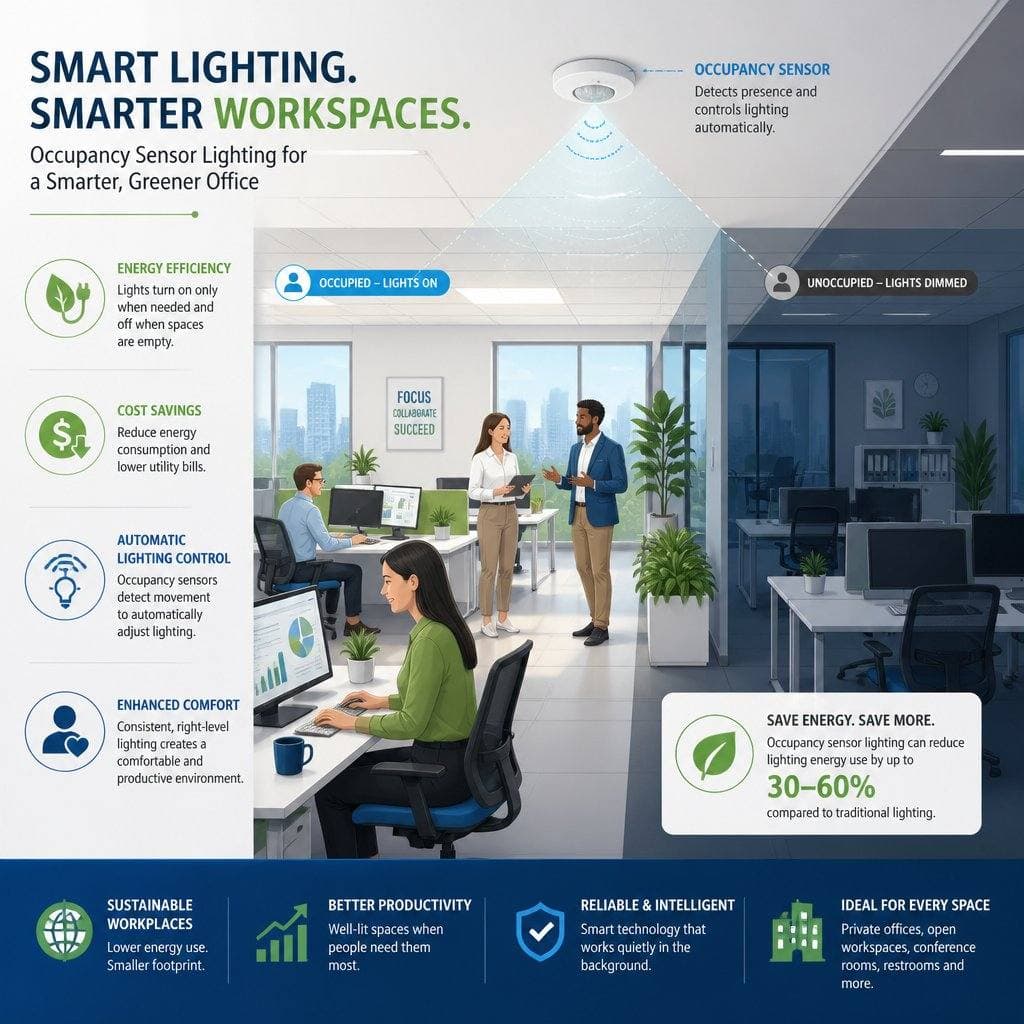
Occupancy sensors watch for movement or heat in a room, then signal the lights to turn on or off. In office spaces, that simple shift can really cut down on wasted lighting in rooms that see sporadic use.
Choosing the right sensor type and putting it in the right spot matters. A good setup fits the room size, traffic flow, and lighting layout so the system feels natural—not distracting or annoying.
Common Sensor Types Used In Commercial Interiors
Most offices use PIR, ultrasonic, or dual-technology sensors. PIR sensors pick up heat and movement, so they’re great for spaces with clear sight lines. Ultrasonic sensors use sound waves, so they pick up motion even with partial obstructions. Dual-technology sensors combine both for better accuracy in trickier rooms.
What Happens When Motion Is Detected
When someone enters, the sensor tells the lights to switch on. After a set period with no movement, the system turns the lights off or dims them, depending on how you set it up.
That timed response is at the heart of the energy savings. It stops lights from running all day in empty spaces—a classic problem in offices with meeting rooms, break areas, and hybrid work schedules.
Where Automatic Lighting Makes The Most Sense
Automatic lighting shines in rooms used in short bursts or left empty a lot. Conference rooms, restrooms, storage rooms, copy rooms, corridors, and private offices all fit that bill.
These are the spaces people forget about during a busy day. Sensors help you avoid paying to light rooms no one’s using.
Energy Savings And Operating Cost Reduction
For most office owners, the main draw is cutting wasted electricity. When lights shut off in empty rooms, you use less power and avoid the hidden cost of keeping spaces lit all day.
Pairing sensors with efficient LED fixtures can boost those savings even more. LEDs use less energy by default, and sensors keep them from running when they’re not needed.
Cutting Waste In Low-Traffic Rooms
Low-traffic rooms usually deliver the fastest payoff. A storage room, restroom, or meeting room might only be used for a fraction of the day, but the lights could stay on much longer than that.
Sensors put an end to that. They make sure the room’s only lit when someone’s actually there.
Pairing Sensors With LED Upgrades
Still using older fluorescent or outdated LED fixtures? Adding occupancy sensors is a quick way to boost performance. LEDs already save energy, and sensors prevent them from running unnecessarily.
A lighting install or office remodel is a great time to add sensors. It’s also smart to check if your switches, wiring, and panel are ready for new controls.
How Reduced Runtime Supports Long-Term Savings
Cutting runtime means lower utility bills and fewer hours on your fixtures. That leads to fewer maintenance calls and slows down how often you have to replace bulbs or drivers.
Over time, those savings add up. For a growing office, occupancy sensors are a handy piece of a bigger electrical maintenance plan.
Workplace Convenience And Employee Experience
Occupancy sensors aren’t just about energy. They also make the office easier to use, especially in shared areas where people come and go all day.
That convenience actually matters. When lighting just works in the background, your team can focus on work instead of remembering switches.
Hands-Free Control In Shared Areas
In spots like copy rooms, break rooms, and restrooms, hands-free lighting is a real perk. People don’t have to fumble with switches if their hands are full, and lights aren’t left on by accident.
It’s a small thing, but it makes daily use smoother. That’s one reason property managers often add sensors during smart home system or smart office upgrades.
Better Lighting Consistency Throughout The Day
Sensors help keep lighting consistent in rooms used at different times. Instead of relying on the last person to flip a switch, the system just responds automatically.
This is especially nice in offices with hybrid schedules. A room feels ready when someone walks in, even if it’s been empty for hours.
Balancing Automation With Occupant Comfort
A good sensor setup should feel natural, not irritating. If lights shut off too fast, people get frustrated or even feel unsafe. If the sensor’s too sensitive, it might turn on when nobody’s around.
Getting time delays and placement right is key. That’s where an experienced electrician can really help.
Safety, Security, And Code-Related Advantages
Occupancy sensor lighting can boost safety by keeping important paths lit as people move through the building. It’s also handy for after-hours use, cleaning, and security.
In offices, lighting control isn’t just about savings. It’s about making sure people can move safely whenever they need to.
Improved Visibility In Hallways And Restrooms
Hallways, stairs, and restrooms are classic spots for automatic lighting. Good visibility cuts the risk of slips, trips, and awkward dark corners.
In bigger buildings, that’s even more important after hours. A reliable lighting system helps everyone move around with more confidence.
Supporting After-Hours Access And Cleaning Crews
Most offices get cleaned after hours, when hardly anyone’s around. Sensors let lights come on for custodial staff without making them hunt for switches in every room.
That same feature helps employees who stay late or come in super early. It’s a small upgrade, but it makes a difference in real life.
Why Proper Installation Matters For Compliance
Some office lighting codes and energy standards require automatic shutoff in certain rooms. Picking the right sensors and setting them up correctly helps you meet those rules.
A licensed electrical contractor can check load compatibility, wiring, and control settings too. That matters if you want the system to work safely and reliably from the start.
Best Locations For This Upgrade
The best spots for occupancy sensors are rooms used in short bursts or left empty a lot. That’s where savings and convenience show up quickest.
You can start with a few high-use areas and add more later. That way, the project stays manageable while still improving your building.
Private Offices And Conference Rooms
Private offices are a great fit—they’re often empty during meetings, lunches, or remote work days. Conference rooms are even more obvious, since their use changes hour by hour.
Wall-switch sensors usually work well in smaller offices with clear sight lines. For bigger conference rooms, ceiling-mounted sensors often give better coverage.
Break Rooms, Storage Areas, And Copy Rooms
These rooms are easy to forget, but they burn a lot of lighting energy. People pop in, grab what they need, and leave, while the lights keep blazing.
Sensors make these spaces more efficient without adding effort for employees. They’re also a smart add-on during routine electrical upgrades or lighting repairs.
Bathrooms, Corridors, And Entry Points
Bathrooms and corridors benefit from automatic lighting because people use them briefly and often. Entry points are good candidates too, especially in smaller offices where visitors need clear lighting as they arrive.
These areas usually give the clearest return on investment. They’re also places where reliable lighting improves both safety and comfort.
Installation Factors And Common Mistakes
A sensor might look great on paper and still work poorly if it’s installed in the wrong spot. Installation details matter just as much as the hardware.
Most problems come from poor coverage, compatibility issues, or rushed setup. Careful installation avoids nuisance triggers and lights that don’t behave as expected.
Sensor Placement Errors That Cause False Triggers
Drafts, vents, glass walls, and moving equipment all mess with sensor performance. Aim a sensor at a hallway, window, or conference room door, and it might turn lights on or off for the wrong reasons.
Spacing matters too. In bigger rooms, mounting the sensor in the wrong place can create dark areas or constant false activations.
Compatibility With Existing Switches, Wiring, And Panels
Not every office system is ready for a sensor swap. Existing switches, fixture loads, wiring, and panel space all affect how well new controls will work.
This is especially true in older buildings or spaces that have been modified over the years. A quick electrical inspection can save you from headaches and rework.
When To Call A Professional Electrical Contractor
If you’re unsure about wiring, dimming, or code requirements, it’s time to call a pro. That’s even more true if your office needs panel upgrades, new circuits, or a bigger smart lighting plan.
A good electrical team helps you avoid flicker, delayed shutoff, and unsafe connections. In Central Texas, that kind of support is valuable whether you manage one suite or several properties.
Long-Term Value For Office Properties
Occupancy sensor lighting adds value beyond the first utility bill. It helps your property run with less waste, less upkeep, and more flexibility as things change.
That matters to tenants, owners, and businesses planning for growth. A more efficient building is just easier to manage and lease.
Lower Maintenance Demands
When lights run less, fixtures and bulbs last longer. That means fewer replacements, fewer service calls, and less disruption in busy offices.
It’s handy in active workplaces where maintenance needs to stay out of the way. It also fits nicely into a broader electrical maintenance schedule.
Support For Smart Building Improvements
Occupancy sensors work well with other upgrades like LED lighting, building controls, surge protection, and smart office systems. They also help with planning if you’re considering future panel upgrades or space changes.
You don’t have to do everything at once to see benefits—sensors are a practical piece of a step-by-step improvement plan.
Appeal For Tenants, Owners, And Growing Businesses
Tenants notice when a building feels modern, efficient, and easy to use. Owners like lower operating costs, and growing businesses appreciate systems that scale with them.
If you’re upgrading an office in Austin, Leander, Hutto, Bee Cave, or anywhere in Central Texas, this is one upgrade that can help your property stand out.
Frequently Asked Questions
How do occupancy sensors help reduce energy costs in office lighting?
Occupancy sensors cut waste by turning lights off when a room’s empty. That reduces how long fixtures run each day and can lower both electricity use and operating costs.
What kinds of occupancy sensors work best for open-plan offices versus private rooms?
Open-plan offices usually do best with ceiling-mounted or dual-technology sensors—they cover bigger areas more reliably. Private rooms often work well with wall-switch or wall-mounted sensors if the desk and seating area are in clear range.
Are occupancy sensors required by building codes or energy standards in office spaces?
Often, yes—certain office rooms need automatic shutoff or occupancy-based controls to meet code or energy standards. The exact rules depend on the room type, project scope, and local codes, so it’s smart to have a licensed electrician check your space.
What are the main downsides or limitations of PIR occupancy sensors in offices?
PIR sensors can miss small movements if people sit still for long stretches, and they need clear sight lines. If you aim them poorly or use them in the wrong room, you might get false shutoffs or lighting gaps.
How do occupancy sensors impact employee comfort, productivity, and visual comfort at work?
When installed well, they make the office easier to use and keep lighting available when people need it. Poor placement or short time delays can frustrate employees, so comfort really depends on proper setup and some trial and error.
What’s the typical payback period for installing occupancy sensor lighting in an office?
Payback? That really depends—room type, how much energy you’re using, what kind of fixtures you’ve got, and of course, labor costs all play a part. From what I’ve seen, offices usually see a quicker return in spots like conference rooms, restrooms, and those long corridors where people constantly forget to flip the switch. Lights just seem to stay on forever in those areas, so sensors can make a real dent in wasted energy.