
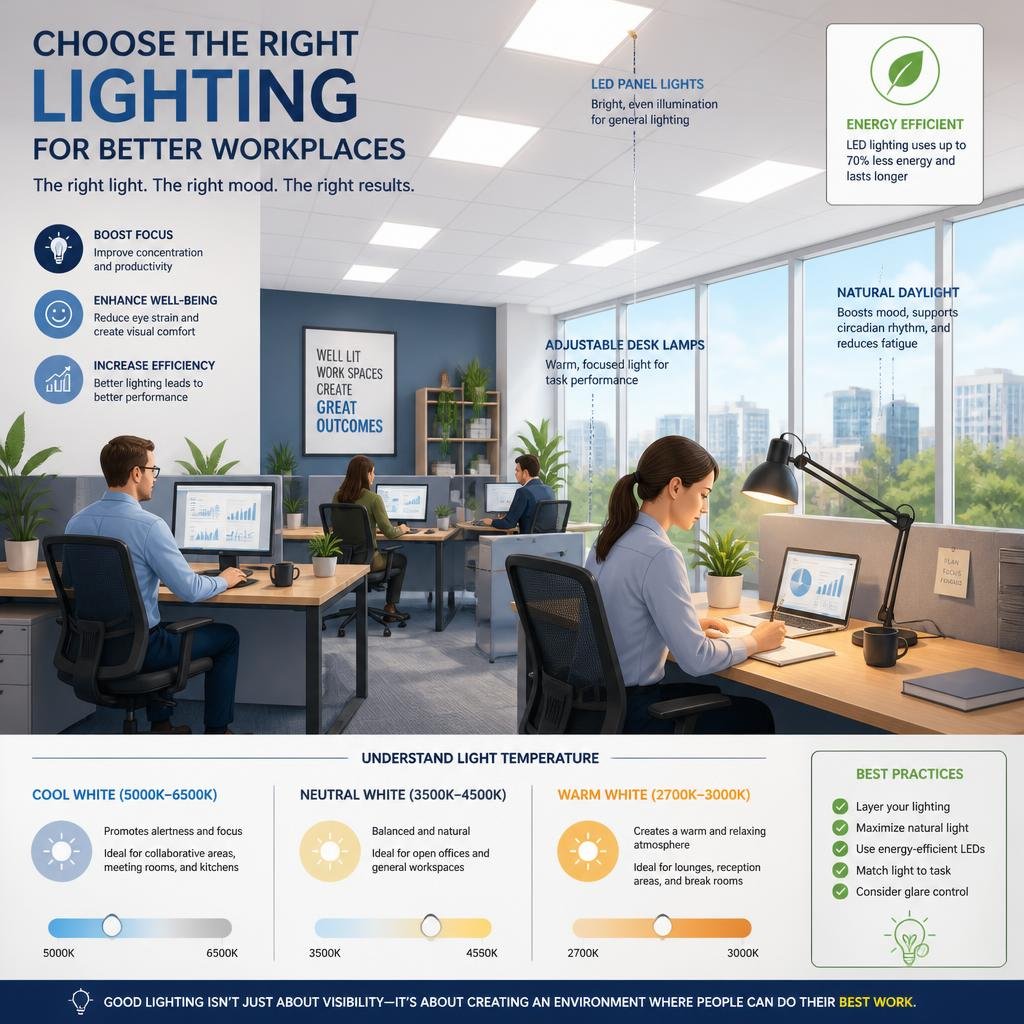
You can really boost comfort, focus, and even save on energy bills when you know how to choose the right lighting for office spaces. The best setup? It’s almost never just one fixture or bulb type. Usually, it takes matching the light to each work area, balancing brightness and color, and thinking about where you put the fixtures based on how the room’s laid out.
When you choose office lighting well, you make it easier for people to read, meet, use screens, and stay comfortable through the day. That also helps reduce glare, eye strain, and wasted energy.
A good office lighting plan should fit how your space actually works. A reception desk, a conference room, and a quiet task area all need different light levels and different fixture choices.
Define the Purpose of Each Work Area
Start by looking at how each part of your office gets used. A space set up for focused computer work needs a different lighting plan than a break area or meeting room.
Match Light Levels to Daily Tasks
List the main tasks in each area. Reading paper documents, working on a laptop, meeting with clients, and reviewing drawings all need clear, even light.
Task areas usually need brighter, more direct light than lounge spaces. If the light is too dim, people strain to see. If it’s too harsh, the space just feels tiring.
Separate Focus Zones From Collaborative Areas
Open offices tend to work better when you create lighting zones. Quiet desks, conference tables, and casual collaboration spots shouldn’t all use the same setup.
Go brighter and more focused in task zones, but keep things softer and more flexible for shared areas. That way, each space does its job without getting in the way of the others.
Balance Brightness, Color Temperature, and Comfort
Brightness matters, but it’s not everything. You also need the right color tone and a setup that’s easy on the eyes during long days.
Use Neutral Tones for Productivity
For most offices, neutral white light works well. It keeps people alert without feeling too warm or too cold. Usually, something in the 3500K to 5000K range is a solid place to start.
Cooler light helps in work areas where people need to stay sharp. Warmer neutral light can feel more inviting in conference rooms, reception spaces, or spots used later in the day.
Reduce Glare and Visual Fatigue
Glare is a classic office headache, especially near screens and shiny surfaces. You can cut it by picking diffused fixtures, aiming light away from monitors, and skipping those blinding bare bulbs.
I always look for even light spread instead of hot spots. When the ceiling, desk, and screen brightness feel balanced, it’s just easier to work for hours.
Make the Most of Layout and Fixture Selection
The shape of your room, the way the furniture sits, and ceiling height all change how lighting works. Good fixture choices help you cover the space evenly without wasting light.
Choose Fixtures for Even Coverage
Recessed fixtures, linear lights, and panel lights usually work well in offices because they spread light across a wider area. Pendant lighting can work too, if you place it thoughtfully.
Even coverage matters more than just adding more fixtures. Too many concentrated lights can make things harsh, while too few create annoying dark spots.
Coordinate Placement With Furniture and Screens
Set up fixtures so they work with desks, conference tables, and wall-mounted displays. Lighting should support the furniture layout, not fight against it.
If you’ve got screens or glass partitions, check the room at different times of day. That’s when you’ll notice reflections from overhead lights—better to catch them early than deal with complaints later.
Plan for Energy Savings and Smart Controls
Energy-efficient office lighting should still feel comfortable and useful. Smart controls help you save power without making the space feel underlit.
Add Occupancy Sensors and Scheduling
Occupancy sensors make sense in conference rooms, storage rooms, restrooms, and other spots that don’t need lights on all the time. They shut off when the room’s empty, which cuts waste.
Scheduling helps in offices with regular hours. You can keep lights off after closing and avoid lighting spaces that aren’t being used.
Integrate Dimming and Automated Lighting
Dimming gives you more control during the day, especially if your space gets natural light. Lower output when the sun’s out, bump it up when clouds roll in.
Automated lighting can make shared spaces more comfortable. When controls are set up right, the lighting adapts to the space, not the other way around.
Prioritize Safety, Code Compliance, and Future Upgrades
Office lighting should do more than look good and save energy. It also needs to support safe operation, meet local requirements, and allow for changes as your business grows.
Check Wiring Capacity and Panel Readiness
Before you add new fixtures or controls, make sure your electrical system can handle the load. Old wiring or an overloaded panel can limit your options and create safety issues.
A careful review of the panel, circuits, and controls can prevent problems later. It also helps you avoid choosing a lighting design that works on paper but not in the building.
Prepare for Expansion and Electrical Improvements
If your office might grow, pick a lighting plan that can scale. That could mean leaving room for more fixtures, extra controls, or upgraded circuits.
This is also a good time to think about related improvements like panel upgrades, lighting retrofits, smart home features, or emergency support. Magnify Electric helps with residential and commercial electrical work across Spicewood, Austin, Bee Cave, Lakeway, Dripping Springs, Georgetown, Leander, Round Rock, Kyle, Cedar Park, Liberty Hill, Westlake, The Hills, Briarcliff, Horseshoe Bay, Sunset Valley, Hutto, and nearby Central Texas communities. Our licensed electricians handle everything from fixture replacements and recessed lighting to automated lighting, Lutron smart home systems, commercial lighting solutions, safety inspections, troubleshooting, panel repairs, outlet services, EV charging outlets, ceiling fans, TV installation, smoke and CO₂ detectors, and more.
Frequently Asked Questions
What types of lighting work best for different office tasks like computer work, meetings, and focused reading?
For computer work, you usually want even ambient light with low glare. Meetings often work best with balanced, adjustable light, while focused reading needs brighter task lighting aimed at the work surface.
How bright should an office be to stay comfortable without causing glare or eye strain?
The right brightness depends on the task and the room, but most offices need enough light to read and work without squinting. The goal is steady, even light that does not create bright spots on desks or screens.
What color temperature should I use to support alertness during the day and comfort later on?
A neutral white range is a good starting point for most offices, often around 3500K to 5000K. Cooler tones can help with alertness in active work areas, while slightly warmer neutral light can feel more relaxed in meeting or reception spaces.
How can I reduce screen glare and reflections from overhead lights and windows?
Use matte finishes where possible, choose diffused fixtures, and avoid placing lights directly above monitor screens. Window treatments, careful desk placement, and dimming controls can also help cut reflections during bright parts of the day.
What’s the best way to combine ambient, task, and accent lighting in a workspace?
Use ambient lighting to fill the room, task lighting for desks and detail work, and accent lighting to highlight features or support the room’s look. Layering light this way gives you more control and makes the office feel more flexible.
How can I make office lighting more energy-efficient while still keeping the space well lit?
LED fixtures, dimming controls, occupancy sensors, and scheduling—these upgrades just make sense. They cut down on wasted energy but still keep your office bright enough for whatever the day throws at you.
If you want pros who actually know their stuff, Magnify Electric is worth a look. Their licensed electricians tackle everything from basic outlet fixes to full office lighting upgrades, smart controls, and even those emergency calls nobody wants to make. They’ll help keep your space safe, efficient, and honestly, just easier to work in.