
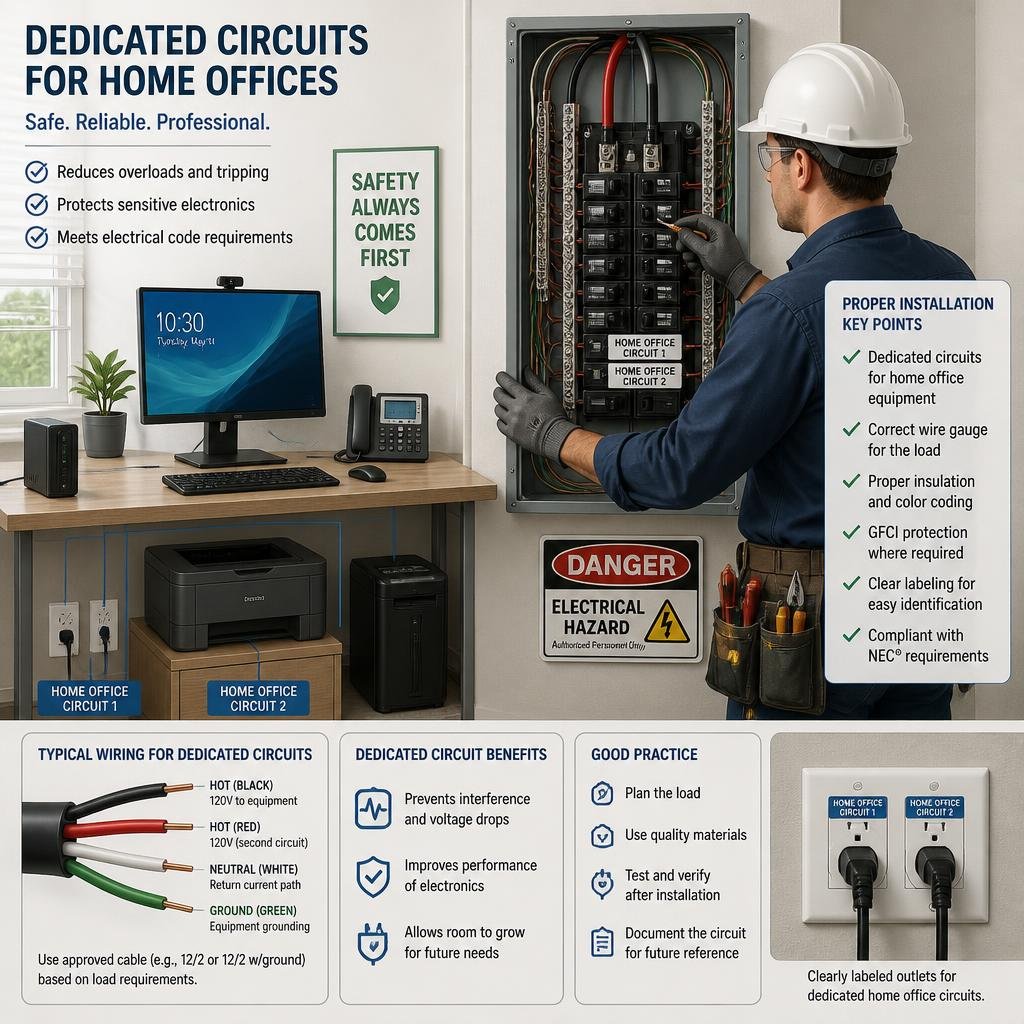
If you’re wondering how to add dedicated circuits for home offices, the gist is simple: when your workspace starts hogging too much power from the rest of the house, it’s time for its own circuit. That way, your computers, monitors, printers, and chargers keep running without random breaker trips or wires getting hot.
A dedicated circuit gives your home office its own protected path from the panel. That can mean fewer interruptions and a safer setup, especially if you depend on your gear every day. In a lot of homes, this upgrade makes the difference between a workspace that just works and one that constantly struggles for power.
If you work from home full time, use several screens, or have gear that stays on all day, a dedicated circuit is usually the smart move. The trick is planning the load, checking your panel’s capacity, and following code so things stay safe and reliable.
When a Home Office Needs Its Own Power Line
A home office really needs its own power line once the room starts acting like a mini command center. All those computers, monitors, printers, speakers, chargers, and network gadgets add up quickly—especially on older, shared circuits.
You’ll often spot signs before something fails. Maybe your lights dim, breakers trip, outlets feel warm, or your computer reboots when someone else turns on an appliance.
Common Equipment That Overloads Shared Wiring
A single desktop computer usually isn’t the problem. But throw in two or three monitors, a docking station, a laser printer, a scanner, a shredder, a router, and maybe a space heater, and suddenly your shared circuit is gasping for air.
The real trouble comes from high-demand items. Space heaters, portable ACs, and printers with heating elements can cause sudden power spikes that old wiring just isn’t built for.
Warning Signs of Insufficient Capacity
If your breaker trips when you print, vacuum, or run a heater, your office circuit is probably maxed out. Flickering lights, buzzing outlets, and random device reboots are also signs something’s not right.
Pay attention to outlets that feel hot, smell burnt, or look discolored. Stop using those circuits and get them checked out—seriously, don’t wait.
Load Planning and Circuit Sizing Basics
Load planning is pretty straightforward: your circuit has to handle everything you plug in without running at the edge all day. For a home office, add up the wattage on your devices and pick a breaker size that matches both the load and the wiring.
Leave some wiggle room for future gear. A circuit that works today should still have space for another monitor, printer, or charger down the road.
Estimating Wattage for Computers and Peripherals
You can figure out your load by checking labels or power supplies on each device. Laptops don’t use much, but a desktop, two monitors, and accessories can easily hit several hundred watts.
Here’s a rough example:
- Desktop computer: 300–600 watts
- Two monitors: 50–150 watts total
- Router and modem: 20–40 watts
- Printer: 300–1,000 watts (while printing)
- Lamp and small stuff: 50–100 watts
That total usually fits on a well-designed branch circuit, assuming the breaker and wire size are right.
Choosing Between 15-Amp and 20-Amp Runs
A 15-amp circuit might be fine for a light home office (think: laptop and basics). A 20-amp circuit gives you more breathing room and is often the better call for a full-time setup.
Most home office upgrades go with 20-amp wiring for flexibility. The right answer depends on your load, wire gauge, and what local code says.
Panel Capacity, Breakers, and Wiring Pathways
Adding a new circuit is just one piece. Your panel needs space and enough capacity for an extra breaker, and the wiring path has to be safe and doable.
The shortest path isn’t always the best. Finished walls, attic access, crawl spaces, and panel layout can all make the install easier or harder.
Checking Available Space in the Electrical Panel
Your panel needs an open breaker slot or a code-approved tandem breaker (if allowed for your panel). If it’s packed, you might need a subpanel or even a service upgrade.
Don’t just look at empty slots—capacity matters, too. A roomy panel can still be overloaded, especially in older homes with lots of added stuff.
Routing Cable Through Finished Walls
Running cable through finished walls takes some finesse. A careful installer will fish cable from the panel to your new outlet while avoiding unnecessary damage to drywall, framing, insulation, and fire blocks.
If your office is finished, expect a little patching or touch-up paint. The cleaner the route and the better the access, the less mess you’ll have.
Code, Permits, and Safety Requirements
Electrical code exists to protect your home and family. For home office circuits, it’s about proper breaker protection, correct wire size, and doing the job to local standards.
If you’re adding a circuit or opening walls, you’ll probably need permits. That’s normal and helps make sure the work gets inspected and logged.
AFCI and GFCI Protection Rules
Most modern home circuits need AFCI protection, which cuts fire risk from arc faults. Certain outlets also need GFCI protection, especially where moisture is a risk.
Requirements depend on the room, circuit location, and your area’s code. A licensed electrician will know what’s needed for your office.
Why Licensed Installation Matters
Panel work isn’t a weekend DIY project. You’re dealing with live wires, breaker sizing, wire terminations, and code compliance—mess up, and you’ve got real safety risks.
A licensed electrician can also spot hidden problems, like overloaded panels, damaged wires, or bad grounding. That kind of check can keep a small upgrade from turning into a nightmare later.
Installation Costs, Timeline, and Disruption
The price for a dedicated office circuit depends on how far it is from the panel, the wiring path, and whether your panel needs work. A simple run costs less and goes faster than jobs that need wall repairs or a panel upgrade.
Most folks should expect a little disruption. Even a tidy install can mean a brief power shutoff, some tool noise, and a bit of dust.
What Affects Project Pricing
Price swings with wire length, breaker type, outlet spots, panel capacity, permit fees, and wall repair. If your electrician has to open drywall or work around tricky framing, costs climb.
Best way to budget? Ask for a site visit and a written quote. That’s way more accurate than guessing from square footage.
How to Prepare the Workspace Before Service
Clear the space around your office wall and electrical panel before the appointment. Move furniture, empty shelves, and make sure there’s a clear path from the panel to the outlet.
It’s smart to back up your computers and shut down sensitive gear before work starts. That little step can save you a headache.
Choosing a Qualified Electrician in Central Texas
You want an electrician who can check your system, size the circuit right, and do the work without cutting corners. That’s even more important in older homes or places with lots of added loads.
A good contractor also keeps things clear. You should know what’s being added, why, and what your new circuit will support.
What to Ask Before Scheduling the Work
Ask if your panel has enough capacity, if the circuit needs AFCI or GFCI protection, and if permits and inspections are included. Find out how they’ll run the cable and if there’s likely to be wall repair.
Think about the future, too. If you might add more monitors, a server, or even a chair lift, your electrician should plan for it now.
Why Magnify Electric Fits Residential and Commercial Needs
Magnify Electric is a solid pick when you need a team that handles both home and business electrical work with care. Our licensed electricians tackle everything from basic fixture swaps to full upgrades, smart home setups, commercial lighting, emergency support, and thorough safety checks.
We handle automated lighting, ceiling fans, smart switches, Lutron systems, EV charging outlets, outdoor lighting, outlet services, recessed lighting, TV installs, surge protectors, wiring, panel upgrades, troubleshooting, generator hookups, smoke and CO₂ detectors, and general electrical improvements for homes and businesses. We serve Spicewood, Austin, Bee Cave, Lakeway, Dripping Springs, Georgetown, Leander, Round Rock, Kyle, Cedar Park, Liberty Hill, Westlake, The Hills, Briarcliff, Horseshoe Bay, Sunset Valley, Hutto, and nearby Central Texas spots.
Frequently Asked Questions
How much does it typically cost to have a new dedicated circuit installed from the electrical panel?
Costs depend on distance, breaker type, panel condition, and whether permits or wall repair are needed. Most homeowners pay a few hundred to about a thousand dollars for a straightforward job; more complex installs run higher.
Do I need a dedicated 20-amp circuit for a home office setup with computers and monitors?
A dedicated 20-amp circuit is usually the safest and most flexible option for a full home office, especially if you have multiple monitors, a printer, docking stations, or other always-on devices.
How can I tell if my electrical panel has enough capacity for adding another circuit?
Check both the physical space and the electrical load. A licensed electrician can inspect the panel label, breaker count, service size, and existing load to see if you’re good to go.
What does the 80% rule mean when sizing a circuit for continuous loads like office equipment?
The 80% rule means you shouldn’t plan to run a circuit at more than 80% of its rated capacity for long stretches. For office gear, that helps keep things cool and adds a safety margin.
What’s involved in running a new circuit from the panel to a new outlet location?
The electrician runs new cable from the panel to the outlet, installs the right breaker, and connects the wiring at both ends. If the walls are finished, they’ll usually fish the cable through hidden spots and patch any small holes afterward.
When should I hire a licensed electrician versus doing parts of the work myself?
Honestly, if you’re dealing with panel upgrades, breaker installs, running new wires, or anything that’s tied up with electrical codes, it’s just smarter to call in a licensed electrician. They know the ins and outs, and you don’t want to mess around with safety. But if you’re just shuffling furniture or getting the space ready—stuff that doesn’t touch the wires—you can handle that on your own. When it comes to the real electrical work, though, it’s best to leave it to someone who does this for a living.